YOUR EXPERIENCE. YOUR NEXT OPPORTUNITY.

Your next chapter.
Beautifully prepared.

A resume that tells your story. Interview support that understands your context. Bring both together in one thoughtful workspace, from your first draft to the next conversation.

One account. Your saved details. A clearer place to start.

Sayman AIInterview Helper

Stay with the conversation.

Voice, screenshots, and your experience, brought together in clear answers that stream as they’re written.

Open Sayman AI 10 free minutes · Web + Windows
SAYMAN IN MOTION WINDOWS · WEB · MOBILE
MEET YOUR WINDOWS COMPANION

Small on your screen.
Big on useful context.

Voice + screenAnswering
System design conversation•••
THE QUESTION

How would you design
a scalable rate limiter?

JD
JordanSpeaking
Sayman AI Manual✦ Answer Ctrl ↵▣ ScreenshotChat
How would you design a scalable rate limiter?
Sayman AI1 / 1
Ready for your question. Thinking

Request an answer when you’re ready.

Preparing your requested answer.

SYSTEM DESIGN

Start with the boundaries.

I’d first clarify the traffic volume and whether limits apply per user, API key, or IP address. Then I’d use a token bucket backed by Redis for shared counters, with atomic updates and an explicit policy for failures.

01 Clarify requirements02 Explain the trade-offs
Windows app

Stay with the conversation.

Press Ctrl + Enter to request an answer. Words appear as they’re generated, so you can start reading while the response takes shape.

Narration is muted. Enable voice to listen.

Illustrative demo. You choose when to request an answer.

YOUR CONVERSATION. YOUR CONTROL.

Sayman ResumesResume Builder

Your story. Beautifully on paper.

A polished resume on a student-friendly budget. Import once, refine every detail, check ATS readiness, and download your finished resume.

Open Sayman Resumes Free simple exports · Affordable designer downloads
FROM EXPERIENCE TO OPPORTUNITY PDF + WORD

Your next chapter, ready to send.

Download your finished resume as a PDF or editable Word document.

Voice is muted.

Illustrative sample with an AI-generated fictional portrait.

Explore the builder

Alongside the tools
you already use.

Zoom
Google Meet
Teams
LeetCode
HackerRank
Use with your permitted interview workflow.
No platform affiliation implied.

Illustrative supported capture. Behavior depends on your Windows version and sharing app. Browser and mobile workspaces do not provide Windows capture protection.

01 / THE PRODUCT

Less juggling.
More understanding.

From the first spoken question to the last line of code, everything has a place.

01.1VOICE INTELLIGENCE

Catch the question.
Keep the context.

Live transcription and automatic question detection keep connected prompts together. Windows brings microphone and meeting audio into the same conversation.

Live transcriptMulti-part questions
01.2SCREEN UNDERSTANDING

The whole problem.
Not just one screenshot.

Capture a single-screen prompt or combine up to five ordered sections. Keep the task, constraints, examples, and visible code together before requesting analysis.

Overview + detailsYou control capture
02 / FROM PROBLEM TO REASONING

Beyond the code.
Understand the why.

A useful answer explains the approach, handles the edge cases, and gives you the reasoning to discuss it.

  • Approach, code, tests, and complexity
  • Coding, debugging, code review, and SQL
  • Language detection and language switching
  • Follow-up questions with conversation context
LeetCodeHackerRankCoderPadFor the coding tasks in your workflow.
Explore the coding assistant
Sayman AI · Coding answerPython
THE APPROACH

A sliding window. A set of seen characters.
Move the left boundary only when you need to.

def longest_unique(text):
    seen = set()
    left = best = 0

    for right, char in enumerate(text):
        while char in seen:
            seen.remove(text[left])
            left += 1
        seen.add(char)
        best = max(best, right - left + 1)

    return best
Empty string Repeated characters Mixed input
TIME O(n)SPACE O(min(n, Σ))Illustrative answer · Σ = alphabet size
YOUR RESUMEReview. Edit. Save.

Backend APIs.
Redis caching.
Distributed systems.

THE JOB DESCRIPTIONChoose the role.

Backend engineer.
Redis and reliable APIs.
Clear technical communication.

YOUR PROFILE · EXAMPLE Backend engineer

API projects · Redis experience · Distributed systems

Review your resume.Example context · interview mode
THE RELEVANT CONNECTION

“I’d draw on my Redis experience to explain caching choices and how I kept the API reliable.”

Illustrative response using the supplied example context.
03 / PERSONALIZED INTERVIEW ANSWERS

Your resume. The JD.
Answers built around you.

ResumeJob descriptionYour profile

In interview mode, your selected resume, job description and profile context help shape answers around your experience and the role. Relevant skills, projects and responsibilities from the information you provide help shape the response.

Connect your experience
to what the role needs.
Review your resume, edit its text and choose the job description for your session. Keep your role and experience up to date so the context reflects you.
01 Review resume02 Add the JD03 Tailor the answer

Resume and job context personalize interview responses. Pure coding mode stays focused on the programming task.

See every interview format
SAME ASSISTANT. DIFFERENT CHALLENGES.

A format for every kind of question.

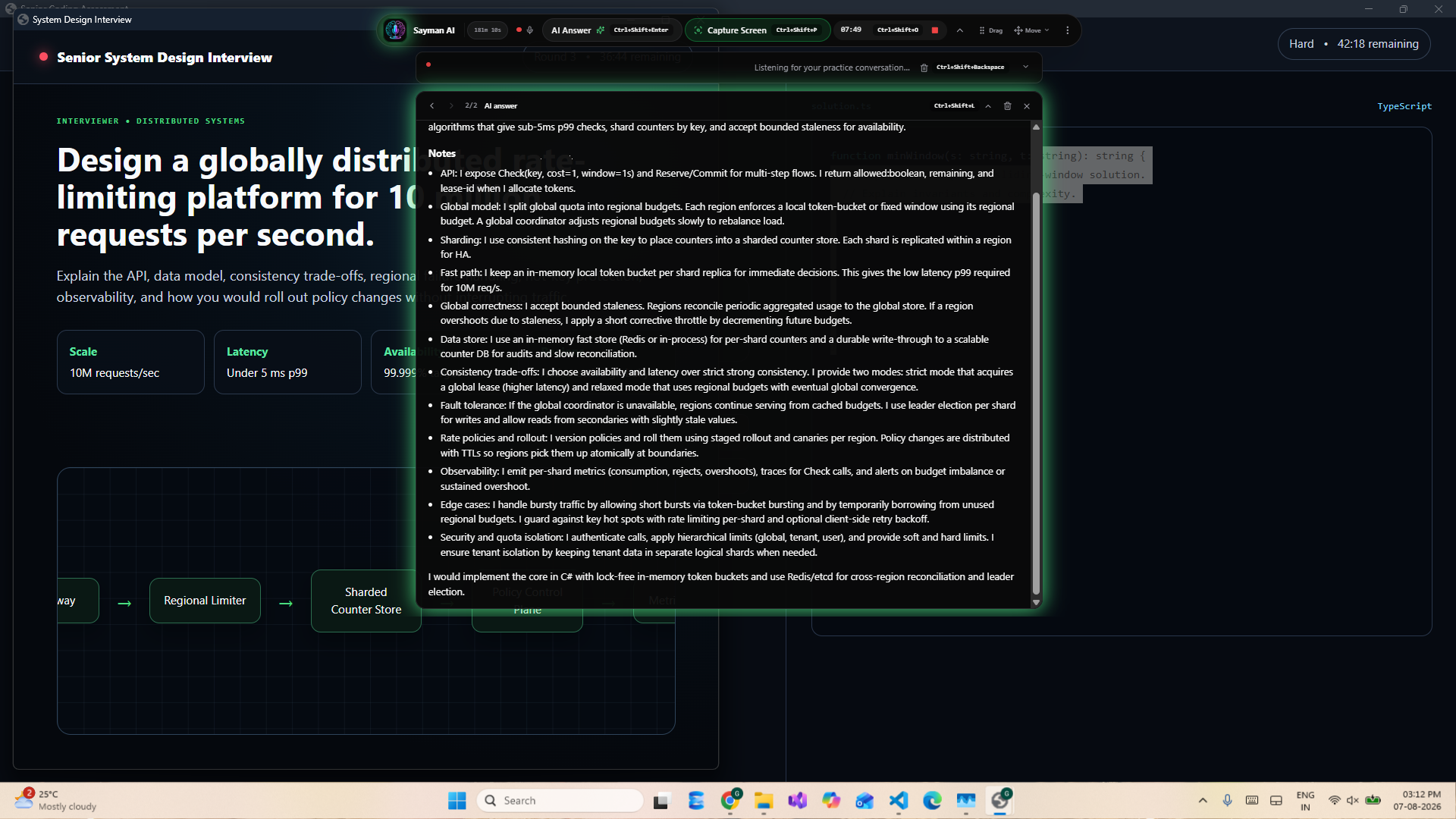
01 Product example showing a structured system-design answer

Technical & system design

Concepts, architecture, trade-offs, and clear explanations you can work through.

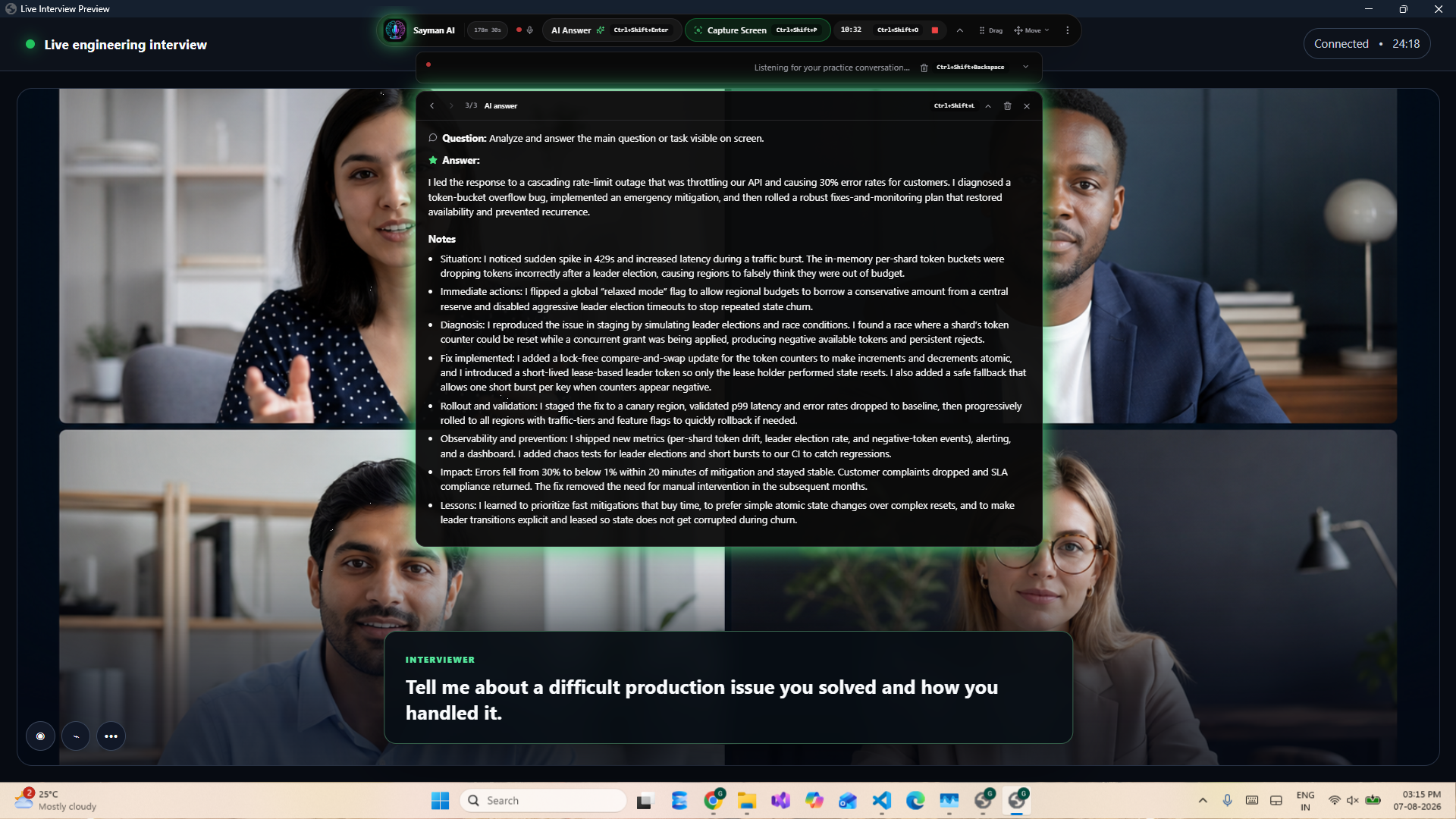
02 Product example showing a behavioral answer and supporting notes

Behavioral & communication

Structured stories grounded in the experience you provide.

03

MCQ & aptitude

Single-choice, multi-select, and quantitative reasoning with an explanation.

04 / BUILT AROUND YOUR WORKFLOW

At your fingertips.
Out of your way.

Ctrlenter
THE WINDOWS OVERLAY

Stay with the conversation.

Request an answer, capture a screen, or open chat with global shortcuts. Move, resize, adjust opacity, and keep the controls where you need them.

Start / stop Ctrl Shift ORequest answer Ctrl EnterCapture section Ctrl Shift Enter
Explore all 12 shortcuts Get Sayman for Windows
THE WEB ASSISTANT

Your workspace. Any screen.

Open your browser on a computer, tablet, or phone. Use live microphone transcription, type a question, or add an image in a layout that adapts to you.

Responsive workspaceNo desktop installBrowser permissions apply
Open your web workspace See the mobile demo

Keep the useful parts.

Browse question-and-answer history, copy code or full answers, and revisit saved sessions.

Carry the context forward.

Ask a follow-up or type a correction. Keep the thread of the conversation intact.

A real place for support.

Reach the Sayman team from your account for product questions and private support messages.

EVERY WINDOWS SHORTCUT, IN MOTION

Less reaching.
More flow.

See each command in action, then keep the complete reference close. Global shortcuts work while another application remains active.

Sayman for WindowsILLUSTRATIVE DEMO
How would you approach this problem?
✦ Sayman AIStart with the boundaries.

Read the response as it arrives.

01 / 12

AI Answer

Request a response to the current question during an active session.

Start a session before requesting answers, capturing sections, or opening chat. These previews never run commands on your device.

01 / CAPTURE EACH SECTIONProblem. Examples. Constraints.

Repeat for up to five ordered screen sections.

Ctrl+Shift+Enter
02 / GENERATE ONE ANSWERBring every capture together.

Analyze all captured sections as one task.

Ctrl+Alt+Enter
05 / THREE SMALL STEPS

Ready, set, conversation.

Let’s get you started
01

Make it yours.

Create an account. Add your resume, role, and job description for personalized interview support.

02

Choose your workspace.

Open the web assistant or download Windows. Choose Voice, Screen, or Combined for your session.

03

Bring the question.

Let the transcript build, capture the relevant screen, or type. Request an answer when you’re ready.

06 / A LITTLE HELP. ON YOUR TERMS.

Start free.
Make every minute count.

One session timer for Voice, Screen, or Combined. Choose a one-time minute pack when you need more.

YOUR FIRST CONVERSATION10 minutes, on us.

No credit card.
Just your free account.

Start free

Loading current minute packs as you explore.

Minutes are charged by elapsed session time. Unused minutes remain available until your pack expires. Premium coding options may use additional coding credits; your workspace shows the current balance.

A FEW GOOD QUESTIONS

Let’s clear
things up.

More questions?
Talk to our team ↗

What is Sayman AI?

Sayman AI is a real-time AI interview assistant on Windows and the web. It brings together live transcription, question detection, screenshot analysis, and streamed answers. You choose when to request help.

How do Windows and web differ?

Windows provides a compact overlay, microphone and system-audio capture, and global shortcuts. The web assistant runs in your browser with microphone transcription, typed questions, and screen capture or image uploads where browser permissions allow.

Can it handle a long coding problem?

Yes. Combine up to five ordered screen sections to include the problem, examples, constraints, and code. Answers can explain the approach, implementation, tests, and time and space complexity.

Does it use my resume and job description?

In interview mode, your saved resume and job description help tailor answers to your experience and role. Pure coding mode focuses on the programming task.

Does it answer every question automatically?

No. Automatic question detection organizes the transcript and connected prompts. Use Answer or Get answer when you want a response, or type a question yourself.

How do free minutes and paid packs work?

Create an account to receive the configured free minutes without a credit card. Paid packs are one-time purchases. Sessions use elapsed time, and each pack’s listed validity determines when its remaining minutes expire.

THE COMPLETE PRODUCT

Every feature, explained.

FOR THE PROBLEM SOLVERS

A closer look at coding.

FOR EVERY KIND OF ROUND

Find your answer format.

YOUR NEXT CONVERSATION STARTS HERE

You bring the experience.
We’ll bring a little clarity.

Meet your interview assistant

10 free minutes · Web + Windows · No credit card